Apple iTunes Gift Card (Turkey)
Automatic codesCodes sent after payment confirmation
Delivery historyView codes in your order
Redeem yourselfFollow the platform redemption rules
Before you buy
Turkey Apple Accounts only; denominations are in TL. Codes are delivered automatically after payment confirmation. Delivered codes are not refundable for change of mind or selection errors. Check region, denomination and account eligibility. Account restrictions can prevent spending even after redemption; contact Apple Support.
Product details
Region and use
This is a digital App Store & iTunes code for a Turkey Apple Account, denominated in Turkish lira (TL). Check your account region and the intended purchase before ordering. Eligible apps, in-app purchases and subscriptions may use the balance. Turkey's terms exclude Apple hardware, other gift cards and cash redemption; redeemed balance is not transferable. Some purchases require another valid payment method.
The system delivers the code automatically after payment is confirmed. Redeem it yourself; do not give us your Apple Account password.
Redeem on iPhone or iPad
1. Confirm that App Store is signed in to your own Turkey Apple Account.
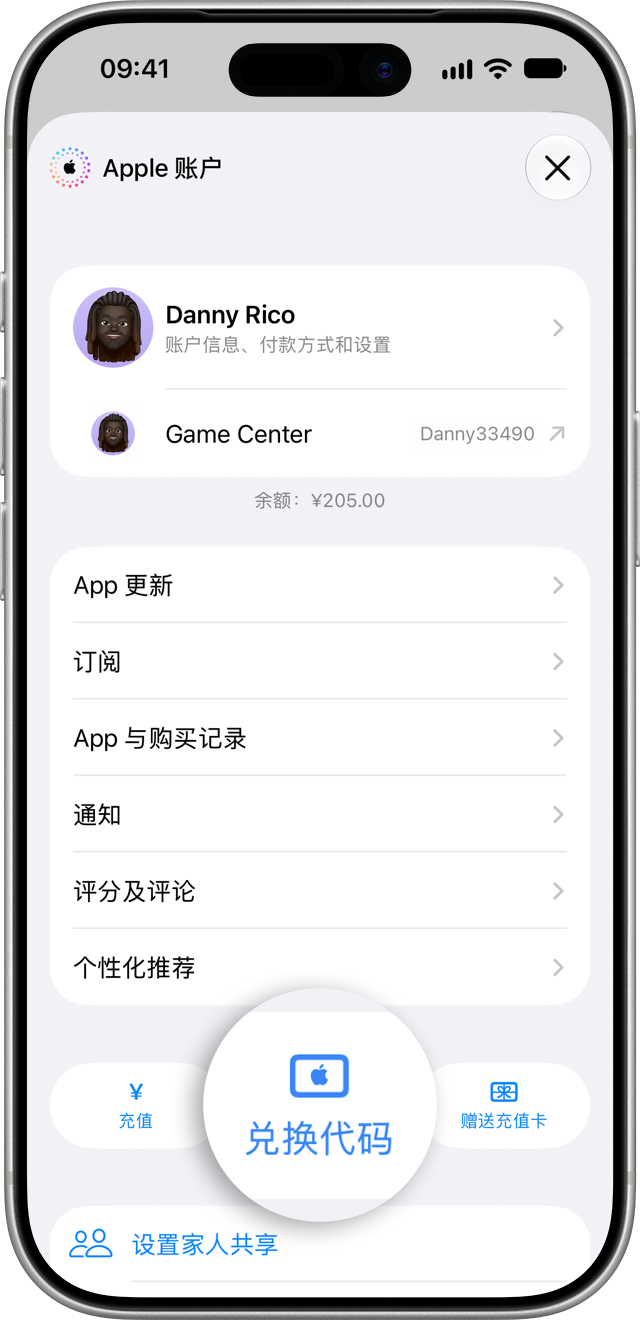
2. Open App Store, tap your profile and select Redeem Code / Redeem Gift Card or Code.
3. Choose manual entry, paste the delivered redemption code (not its serial number), check it and redeem.
4. Check your account balance, then make an eligible purchase.
The Apple Support illustration below uses a Chinese interface. Its sample name and CNY balance do not indicate this card's region or currency. Screens vary by device version. On Mac, use the App Store account page; on Windows, use the account menu in Apple Music or Apple TV.
Official instructions and image source: https://support.apple.com/zh-cn/118242
Account restrictions, limits and review
A valid code or credited balance does not guarantee a successful purchase. Account status, payment requirements or security restrictions can prevent spending. A purchase error alone does not prove either a defective code or a security restriction.
Turkey's terms allow Apple to restrict orders, accounts, services or balance when it suspects fraud, unlawful use or a breach of terms. The terms reviewed do not specify one daily purchase count or TL limit for every account, or a guaranteed recovery period. Follow Apple's current prompts and decisions. Store stock is not an Apple redemption or spending allowance.
If prompted to request review, contact Apple Support. A disabled Media & Purchases account can request reactivation. Provide accurate error and transaction information and any documents Apple requests. Do not send us passwords or verification codes. Apple decides the outcome and timing; we cannot remove restrictions or guarantee approval.
Apple Support: https://getsupport.apple.com/
Disabled account guidance: https://support.apple.com/zh-cn/108100
Turkey terms: https://www.apple.com/legal/internet-services/itunes/giftcards/tr/terms.html
Returns and support
Once a digital code is delivered, returns, exchanges and refunds for change of mind, wrong region or wrong denomination are not supported. Check the region, amount and account status before payment.
If it has not been sent, contact store support to check fulfilment status. Report incorrect, invalid, unactivated or apparently previously used codes with your order number, error and relevant evidence. Confirmed supply faults will be handled by replacement, redelivery or refund as appropriate.
An account purchase restriction after successful redemption requires Apple investigation; it does not by itself establish a code fault or guarantee a refund or reactivation. Statutory consumer rights remain unaffected.
Troubleshooting and sources
For a region error, check the account and card region. For an invalid, used or unactivated code, check characters and balance, then contact store support. Apple may request proof of purchase and a serial number; provide the documents available for your digital code. If balance is credited but spending fails, retain the error and contact Apple Support about the account and payment requirements.
Redemption help: https://support.apple.com/zh-cn/108285
Balance eligibility: https://support.apple.com/zh-cn/118245
Apple's current linked policies prevail. Information checked on 2026-10-23.
This is a digital App Store & iTunes code for a Turkey Apple Account, denominated in Turkish lira (TL). Check your account region and the intended purchase before ordering. Eligible apps, in-app purchases and subscriptions may use the balance. Turkey's terms exclude Apple hardware, other gift cards and cash redemption; redeemed balance is not transferable. Some purchases require another valid payment method.
The system delivers the code automatically after payment is confirmed. Redeem it yourself; do not give us your Apple Account password.
Redeem on iPhone or iPad
1. Confirm that App Store is signed in to your own Turkey Apple Account.
2. Open App Store, tap your profile and select Redeem Code / Redeem Gift Card or Code.
3. Choose manual entry, paste the delivered redemption code (not its serial number), check it and redeem.
4. Check your account balance, then make an eligible purchase.
The Apple Support illustration below uses a Chinese interface. Its sample name and CNY balance do not indicate this card's region or currency. Screens vary by device version. On Mac, use the App Store account page; on Windows, use the account menu in Apple Music or Apple TV.
Official instructions and image source: https://support.apple.com/zh-cn/118242
Account restrictions, limits and review
A valid code or credited balance does not guarantee a successful purchase. Account status, payment requirements or security restrictions can prevent spending. A purchase error alone does not prove either a defective code or a security restriction.
Turkey's terms allow Apple to restrict orders, accounts, services or balance when it suspects fraud, unlawful use or a breach of terms. The terms reviewed do not specify one daily purchase count or TL limit for every account, or a guaranteed recovery period. Follow Apple's current prompts and decisions. Store stock is not an Apple redemption or spending allowance.
If prompted to request review, contact Apple Support. A disabled Media & Purchases account can request reactivation. Provide accurate error and transaction information and any documents Apple requests. Do not send us passwords or verification codes. Apple decides the outcome and timing; we cannot remove restrictions or guarantee approval.
Apple Support: https://getsupport.apple.com/
Disabled account guidance: https://support.apple.com/zh-cn/108100
Turkey terms: https://www.apple.com/legal/internet-services/itunes/giftcards/tr/terms.html
Returns and support
Once a digital code is delivered, returns, exchanges and refunds for change of mind, wrong region or wrong denomination are not supported. Check the region, amount and account status before payment.
If it has not been sent, contact store support to check fulfilment status. Report incorrect, invalid, unactivated or apparently previously used codes with your order number, error and relevant evidence. Confirmed supply faults will be handled by replacement, redelivery or refund as appropriate.
An account purchase restriction after successful redemption requires Apple investigation; it does not by itself establish a code fault or guarantee a refund or reactivation. Statutory consumer rights remain unaffected.
Troubleshooting and sources
For a region error, check the account and card region. For an invalid, used or unactivated code, check characters and balance, then contact store support. Apple may request proof of purchase and a serial number; provide the documents available for your digital code. If balance is credited but spending fails, retain the error and contact Apple Support about the account and payment requirements.
Redemption help: https://support.apple.com/zh-cn/108285
Balance eligibility: https://support.apple.com/zh-cn/118245
Apple's current linked policies prevail. Information checked on 2026-10-23.